
The short version: A Google Business Profile is free and takes an afternoon to set up properly. It's the biggest lever you control over whether a home-service business appears in local results. What matters: precise categories, a full services list, real photos added regularly, and reviews you actually ask for. Everything else is maintenance.
Google My Business vs Google Business Profile
Quick clarification, because both names are still in use. Google My Business was renamed Google Business Profile in 2021. Same product, new name, and management moved from the standalone app into Google Search and Maps directly. If you search "Google My Business optimization," you're looking for this.
What a Google Business Profile is and why it matters
Your business profile is the listing that appears in Google Maps and in the local pack above the organic search results. It's a free listing, owned by you, and it's what Google consults first when someone runs a local search.
It also powers your knowledge panel — the information box showing your hours, phone, photos, and Google reviews when someone searches your business name directly.
For home service businesses this matters more than for most categories. Someone searching "pool builder near me" or "emergency plumber Plano" isn't researching. They're ready to call local businesses, and they call from the map pack.
Your website supports the profile. The profile is often what actually gets found.
How Google ranks local businesses
Google states that local search rankings come down to three factors:
Relevance — how well your profile matches what someone searched. Driven by categories, services, business description, and reviews.
Distance — how close you are to the searcher. Largely outside your control.
Prominence — how well known the business is. Review volume, citations, links, and website authority.
Everything below is about improving relevance and prominence, since distance isn't yours to change.
Step 1: Claim or create the listing
Go to google.com/business and search your business name.
If a listing already exists, Google may have auto-generated it from other sources. Claim it rather than creating a duplicate — duplicates cause suspensions and split your reviews.
If nothing exists, create one.
One warning: the Google Business account that creates the profile owns it. Don't let an agency or a departing employee create it under their own account. Every business owner who has learned this the hard way learned it during a dispute.
Step 2: Your business name
Enter it exactly as it appears on your signage, licensing, and invoices.
Do not add keywords. "Carpenter Pools" is your business name. "Carpenter Pools — Best Pool Builder Dallas Fort Worth" violates Google's guidelines and is a common suspension trigger, usually after a competitor reports it.
This is one of the most tempting shortcuts in local SEO and one of the most punished.
Step 3: Choose categories precisely
This is the most consequential choice in the entire setup, and most business owners rush it.
Your primary category is a key ranking signal. It tells Google what you fundamentally are, and it carries more weight than any other field.
Google offers thousands of categories — enough that a precise match almost always exists.
Be specific. "Contractor" is a category. So is "Swimming pool contractor." If you build pools, the second is dramatically better because it places you in exactly the relevant searches.
How to choose well:
- Search your main service and see which local businesses rank in Google Maps
- Check what primary category those businesses use
- Pick the most specific category that matches your main revenue source exactly
Add secondary categories and relevant subcategories for your other services — they help target your ideal audience. But keep them honest. A pool builder who also does outdoor kitchens should add that. Adding "general contractor" to catch more searches dilutes your relevance rather than expanding it. Inaccurate category selection reduces visibility rather than increasing it.
You can change categories later, but expect ranking movement. Get it right the first time.
Step 4: Set your service area
Home service businesses differ from retail here, and this is where profiles commonly go wrong.
If customers come to you — a showroom or office — list your physical address.
If you go to customers — most contractors — set up as a service area business and hide the address. Google explicitly supports this. You define the cities, ZIP codes, or regions you serve; your street address stays private.
Setting it well:
- List cities you genuinely serve and would drive to tomorrow
- Don't list the whole metro if you work in four suburbs — an overly broad area dilutes relevance and produces unqualified calls
- You can list up to 20 areas; using all 20 is usually a mistake
Multiple locations? Each physical location gets its own profile, each with its own address, local phone number, and manager. Don't run several locations from one listing.
On address accuracy: a virtual office or a relative's address in a city you want to rank in is a guideline violation. In competitive metros competitors report these routinely, and suspension appeals take weeks.
Step 5: Verification
Google requires verification before your listing appears publicly. Depending on your business type you may get:
Video verification — increasingly the default. One continuous recording showing your location or work vehicle, your equipment, and evidence you manage the business.
Postcard — mailed with a code, about a week.
Phone or email — for some established businesses.
Video tips, since this trips people up: one continuous take, no cuts. Show branded signage or a vehicle wrap, tools specific to your trade, and finish by showing something proving you manage a real business — keys, an invoice book, office access.
Most failures come from insufficient evidence the business is operating, not from suspected fraud. You can retry.
Step 6: Complete every section of your business information
An incomplete profile is the most common problem in local search and it's entirely self-inflicted. Completing core business info improves visibility and customer engagement, and it builds trust with people reading the listing.
Services. List every service individually with descriptions. Not "pool services" — "pool construction," "pool remodeling," "pool equipment repair," each with a couple of sentences. Direct relevance signal, and most profiles leave it blank.
Business description. 750 characters. Describe what you do, where you do it, and what makes your business stand apart. Use relevant keywords where they align with how customers actually search — but write it for a human. Keyword stuffing here does nothing.
Hours, accurate, including holidays. Indicate emergency service if you offer it.
Attributes. Veteran-owned, women-owned, appointment required, on-site services, languages. Attributes match specific user queries and some surface as filters in search.
Products. Underused by contractors. List service packages with prices and photos.
Opening date, signaling how long you've been established.
Social media accounts. Google now supports social profile links. Add them.
Booking link, if you use one.
Step 7: Adding photos — and keeping at it
Photos matter unusually much for home service businesses, and this is where the gap between profiles is widest. Profiles with high-quality photos get more engagement and clicks.
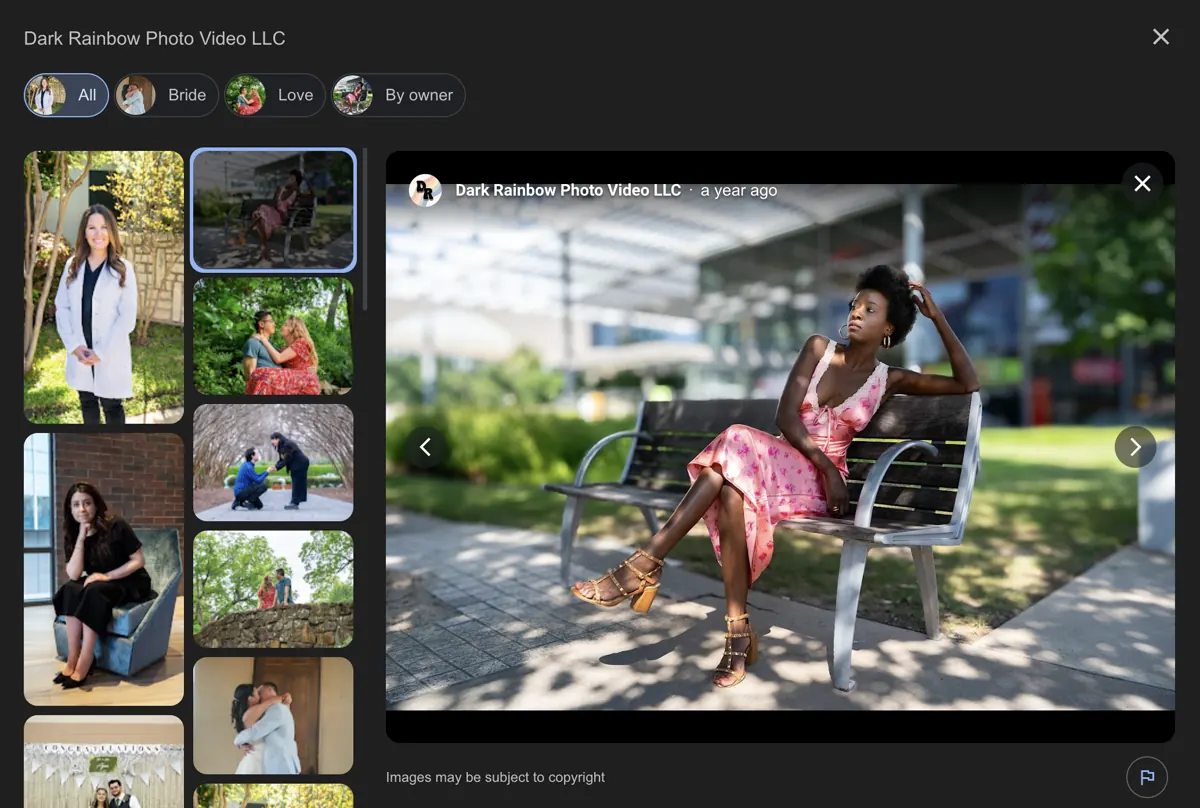
A listing with twelve photos loses to one with two hundred. For a business whose product is visual, that's a strange way to lose.
A profile with no photos may display Google Street View imagery of your address instead — often a random building or an empty lot. That's the default you're accepting by doing nothing.
What to upload:
- Completed projects — the bulk of it, multiple angles per job
- Before and after pairs
- Your team at work on site
- Branded vehicles and equipment
- Logo and cover photo
- Videos. Short clips of finished work give customers a sense of scale that stills can't.
Practical guidance:
- Upload high-quality images in batches monthly, not once at setup. Regularly updated photos signal that your business is active.
- Name files descriptively before uploading
- Shoot in good light — early morning or late afternoon. Midday sun flattens everything.
- Landscape orientation displays better in most placements
- Skip stock photography; it's obvious and it undercuts you
Encourage customers to post photos. User-generated photos give a listing a local, authentic feel that your own uploads can't replicate.
Step 8: Google reviews and your online reputation
Local search practitioners consistently rank review signals among the strongest factors in map pack placement, and reviews are the most visible thing a potential customer sees.
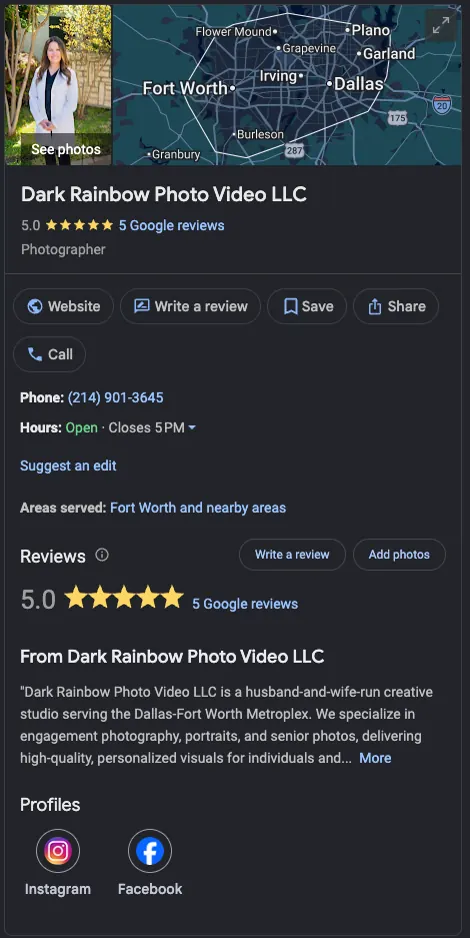
Three things matter:
Volume. Your count relative to competitors in your city, not the metro.
Velocity. A steady flow of recent reviews signals activity and trust. Forty reviews in 2023 and three since reads badly to Google and to humans.
Response rate. Active engagement with reviews influences ranking and visibly affects how prospects read your listing. An unanswered two-star complaint does real damage.
A review strategy that works:
- Ask at completion, in person, while the customer is happy
- Follow with a text containing your direct review link — Google provides a short link in your dashboard
- Make it a step in your job closeout checklist, not something you remember occasionally
- Prompt customers consistently; happy customers rarely think to review unprompted
- Never offer incentives — a guidelines violation that can cost you the reviews
Handling negative feedback: respond calmly, factually, briefly. Don't argue. Prospects read your response more carefully than the complaint, and a measured reply often converts better than a spotless profile.
Step 9: Google Posts
One of the most underused features, and a direct freshness signal.
Google Posts are short updates appearing on your profile — a completed project, a seasonal offer, a service update. They expire, so consistency matters. Google recommends posting at least weekly.
Post types include:
- Updates — general news, recent work
- Offers — special promotions with start and end dates
- Events — open houses, showroom events
- Products — specific services with pricing
A photo plus two sentences is enough. Regularly publishing Google Posts keeps the listing fresh and gives returning visitors something new.
Step 10: Q&A
Anyone can ask a question on your profile, and anyone can answer — including competitors and confused strangers.
Seed it yourself with questions you actually get: "Do you offer financing?" "How long does a pool take?" "Do you serve Prosper?" Then answer them. Monitor it so incorrect answers don't sit unchallenged.
Q&A improves customer engagement and pre-answers the objections that otherwise cost you a call.
Step 11: NAP consistency across the web
Your NAP — name, address, phone — should be identical on your profile, your website, and every directory listing. Consistent NAP information helps Google confirm all those listings refer to one real business, which feeds prominence.
Also:
- Use a local phone number, not a call-tracking number that differs from your site
- Link the profile to the most relevant page on your website, not always the homepage
- Add LocalBusiness schema markup to your site with matching business information
- Make sure your website lists the same service area
Step 12: Monitor insights and maintain
Your profile is a maintenance habit, not a setup task.
Insights in your dashboard show how customer searches found you, what people did next, and which photos get viewed. Monitoring insights tells you which searches you're actually appearing for — often not the ones you assumed.
Monthly: add photos, publish a post, respond to all reviews, check Q&A.
Quarterly: review categories against what you actually sell, update services and hours, check insights for search trends.
Watch for unauthorized edits. The public can "suggest an edit," and competitors occasionally mark businesses as permanently closed or change hours. Check monthly and enable notifications.
Categories and services by trade
The single most common mistake I see is a vague primary category. "Contractor" tells Google almost nothing. Below are the exact category names Google offers, verified against its category list on Sept 8, 2026. Pick the primary that describes most of your revenue, add one or two secondaries, and list services under each.
Pool companies. Primary: Swimming pool contractor. There is no "pool cleaning" category, so cleaning-only companies use the same one. Services (examples): pool cleaning, equipment repair, pool remodeling. Photo: a finished pool with your crew in frame.
Fence companies. Primary: Fence contractor. Services (examples): wood privacy fence, iron fence, fence repair, gate installation. Photo: a completed run with the house visible, so it reads as real.
Siding companies. Primary: Siding contractor. Services (examples): siding replacement, siding repair, soffit and fascia. Photo: before and after on the same elevation.
Septic companies. Primary: Septic system service. Services (examples): pumping, inspection, aerobic system repair, new installation. Photo: the truck on a job, not a stock tank.
Gutter companies. Primary: Gutter cleaning service for cleaning-first businesses, or Gutter service if you install. Services (examples): cleaning, gutter guards, seamless gutter installation. Photo: the crew on the ladder.
Garage door companies. Primary: Garage door supplier. Services (examples): opener repair, spring replacement, new door installation. Photo: a finished door on a real house.
Home builders. Primary: Home builder. Services (examples): custom homes, additions, whole-home remodels. Photo: a finished exterior at golden hour — you have the budget for one good shot.
Plumbers. Primary: Plumber. Full plumber guide: Google Business Profile for plumbers.
Whatever the trade: the category shapes which searches you can appear for. The services list and photos decide whether you win them.
Common mistakes businesses ignore
- Keywords in the business name — guideline violation, frequent suspension cause
- A virtual or fake physical address
- Categories chosen too broadly
- Empty services list — a direct relevance signal left blank
- Photos uploaded once, never again
- Reviews ignored, especially negative ones
- Duplicate listings splitting reviews
- An agency owning the Google Business account instead of you
Frequently asked questions
Does a Google Business Profile cost anything?
No. Google's own page says it plainly. "Creating a Business Profile and listing your business on Google is free." Anyone charging you for the listing itself is charging for their time, not for Google. Source: Google Business Profile.
Do I need an LLC to have a Business Profile?
No. Google's guidelines set no legal-entity requirement. The test is whether you have a location customers can visit or travel to customers where they are. Sole proprietors qualify. Source: Guidelines for representing your business on Google.
Who is eligible?
Google's wording: "If your business either has a physical location that customers can visit, or travels to customers where they are, you can create a Business Profile on Google." If you work from home, the same guidelines say to hide your address and list your service area instead. Source: Guidelines for representing your business on Google.
Can I manage more than one business from one Google account?
Yes. I manage three profiles from a single account, and Google's business groups exist for managing several. Keep one profile per business, though; Google treats duplicates for the same business as a policy problem. Sources: Create and manage business groups, Resolve duplicate profiles.
What to expect
A complete, active profile in a market where competitors have neglected theirs can move quickly. In a competitive metro where everyone does this properly, it's slower and depends on review volume and website authority.
Be skeptical of anyone quoting a specific timeline before looking at your market. How long it takes depends on what your competitors have already built.
The compounding part: reviews and photos accumulate. A profile with three years of consistent activity is genuinely hard to overtake — which is exactly why starting now beats starting later.
The profile is one of three levers. The others are in the complete contractor SEO guide and how DFW home-service companies win the Map Pack. If you'd like the profile set up and maintained as part of a plan, see local SEO services.
Carpenter Growth works with high-ticket home service businesses across Dallas-Fort Worth on local visibility and original photography.
This note is part of the broader Contractor SEO: The Complete Guide.
To connect that profile work to the DFW map-pack opportunity, read Map Pack DFW: Why Dallas-Fort Worth Home Service Companies Miss It.
For an evidence-led local review of your own business, explore Local SEO services for service businesses.